Simon Shi的小站

人工智能,机器学习, 强化学习,大模型,自动驾驶

0%

无人驾驶(3)感知基础

无人驾驶感知基础–车道线检测

[toc]

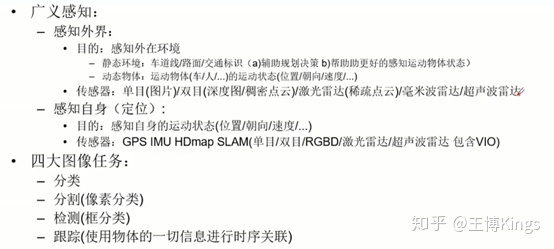
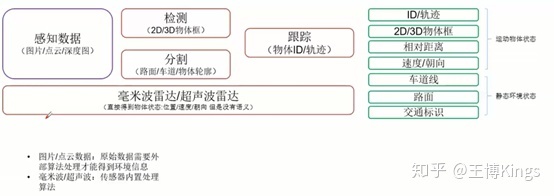
3.1无人驾驶感知系统概述

Preception

img

img

Content

  • 实战基于传统方法的车道线检测
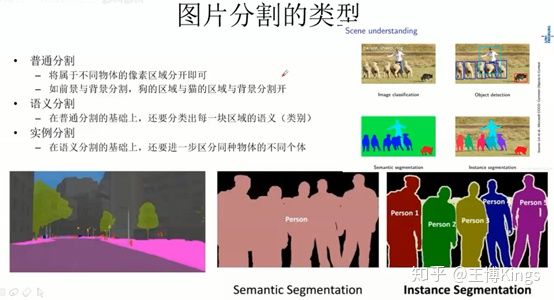
  • 图片分割算法综述
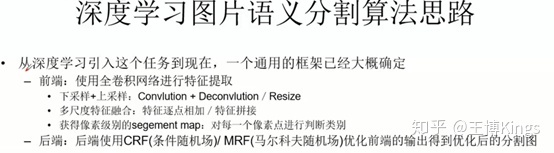
  • 实战基于深度学习的图片分割算法综述

3.2 实战分割基于传统方法的车道线检测

静态环境感知与分割算法

https://github.com/andylei77/lane-detector

对比算法:

Zhihu算法集锦(8)|自动驾驶|车道检测实用算法

1
2
3
4
5
6
# 该算法利用了OpenCV库和Udacity自动驾驶汽车数据库的相关内容。
摄像头校准,以移除镜头畸变(Lens distortion)的影响
图像前处理,用于识别车道线
道路视角变换(Perspective transform)
车道线检测
车辆定位和车道半径计算

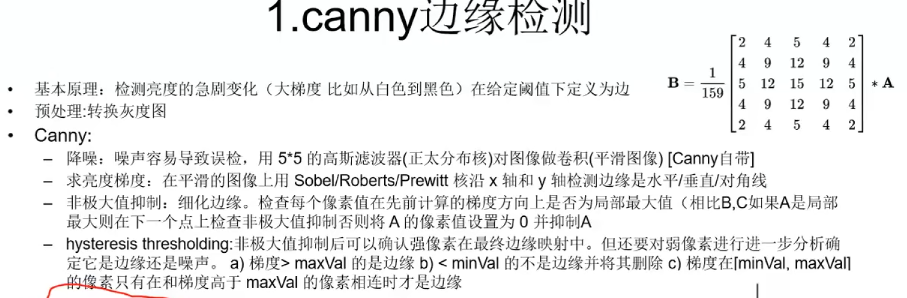
3.2.2 canny边缘检测

image-20220412102729106

1
2
3
4
5
6
7
8
def do_canny(frame):
# Converts frame to grayscale because we only need the luminance channel for detecting edges - less computationally expensive
gray = cv.cvtColor(frame, cv.COLOR_RGB2GRAY)
# Applies a 5x5 gaussian blur with deviation of 0 to frame - not mandatory since Canny will do this for us
blur = cv.GaussianBlur(gray, (5, 5), 0)
# Applies Canny edge detector with minVal of 50 and maxVal of 150
canny = cv.Canny(blur, 50, 150)
return canny

3.2.3 手动分割路面区域

image-20220412103304006

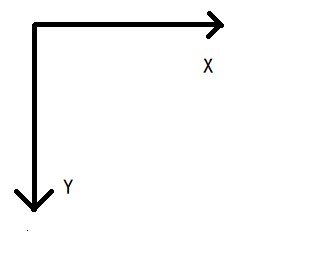
CV坐标系

  • polygones=[] # 手动指定三角形的三个点
  • mask = zeros_like() 生成mask
  • fillpoly(mask, polygones, 255) ; poly 范围内填充255,区域外保留原始值
1
2
3
4
5
6
7
8
9
10
11
12
13
14
15
def do_segment(frame):
# Since an image is a multi-directional array containing the relative intensities of each pixel in the image, we can use frame.shape to return a tuple: [number of rows, number of columns, number of channels] of the dimensions of the frame
# frame.shape[0] give us the number of rows of pixels the frame has. Since height begins from 0 at the top, the y-coordinate of the bottom of the frame is its height
height = frame.shape[0]
# Creates a triangular polygon for the mask defined by three (x, y) coordinates
polygons = np.array([
[(0, height), (800, height), (380, 290)]
])
# Creates an image filled with zero intensities with the same dimensions as the frame
mask = np.zeros_like(frame)
# Allows the mask to be filled with values of 1 and the other areas to be filled with values of 0
cv.fillPoly(mask, polygons, 255)
# A bitwise and operation between the mask and frame keeps only the triangular area of the frame
segment = cv.bitwise_and(frame, mask)
return segment

3.2.4 霍夫变换得到车道线

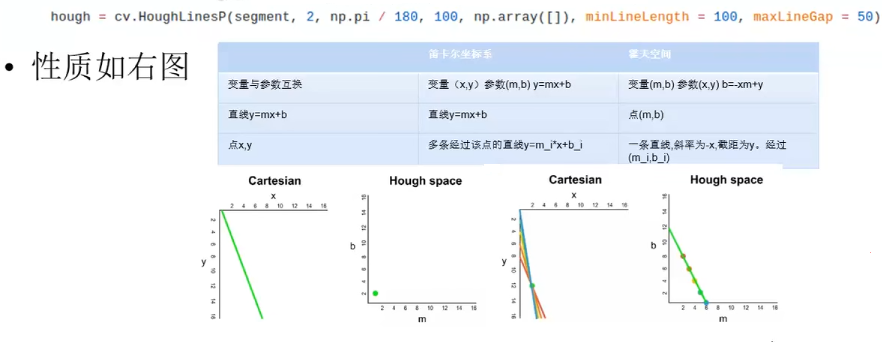
  • 霍夫变换

    • 参数和变量互换
  • 图像中的一条线,变换到霍夫空间,就变成一个(霍夫空间的)点

  • 图像中的一个点(有多条线穿过),对应霍夫空间的一条线;

cartesian: 笛卡尔坐标系

image-20220412103416004

  • 将笛卡尔坐标系中一系列的可能的点(连接成线),投影到霍夫空间(应该是一个点)

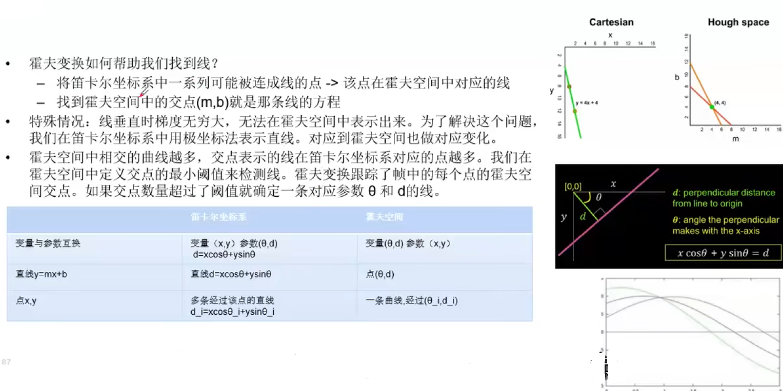
另一种霍夫空间(极坐标)

  • 极坐标法表示直线

image-20220412103957969

HoughLinesP函数在HoughLines的基础上末尾加了一个代表Probabilistic(概率)的P,表明它可以采用累计概率霍夫变换(PPHT)来找出二值图像中的直线。

1
hough = cv.HoughLinesP(segment, 2, np.pi / 180, 100, np.array([]), minLineLength = 100, maxLineGap = 50)

3.2.5 获取车道线并叠加到原始图像中

  • 综合所有线,求两条车道线的平均斜率和截距
1
2
3
4
5
6
7
8
9
10
11
12
13
14
def calculate_lines(frame, lines):
return [left_line, right_line]

def calculate_coordinates(frame, parameters):
slope, intercept = parameters
# Sets initial y-coordinate as height from top down (bottom of the frame)
y1 = frame.shape[0]
# Sets final y-coordinate as 150 above the bottom of the frame
y2 = int(y1 - 150)
# Sets initial x-coordinate as (y1 - b) / m since y1 = mx1 + b
x1 = int((y1 - intercept) / slope)
# Sets final x-coordinate as (y2 - b) / m since y2 = mx2 + b
x2 = int((y2 - intercept) / slope)
return np.array([x1, y1, x2, y2])

3.3 实战基于深度学习的图片分割算法综述

3.3.1 代表算法讲解

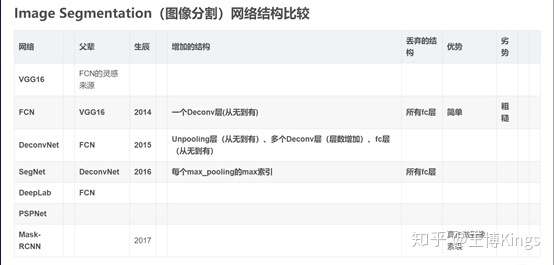
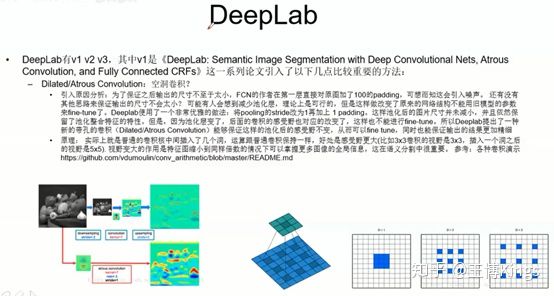
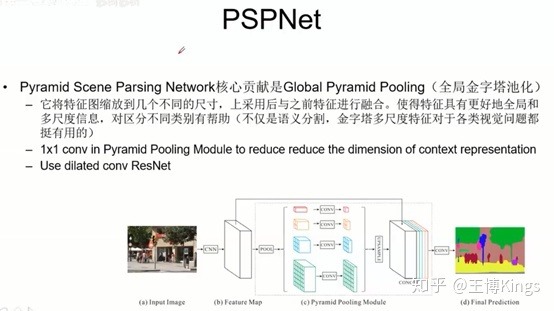
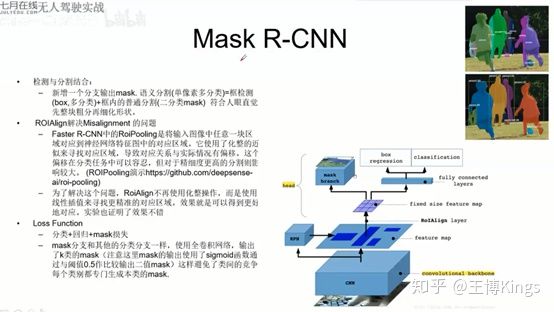
img

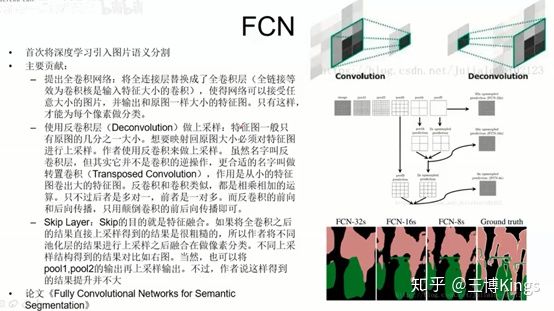
img

全连接

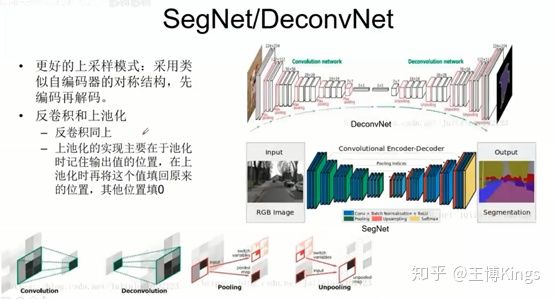
下采样上采样,池化

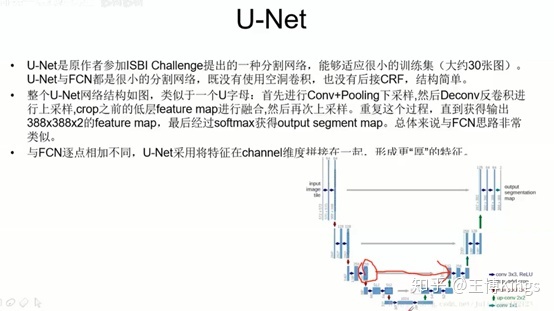
融合,上采样的和下采样平行的融合

语义地图,比如输入RGB3通道,最后输出是6个分类,那就是6张图

img

img

img

img

img

img

img

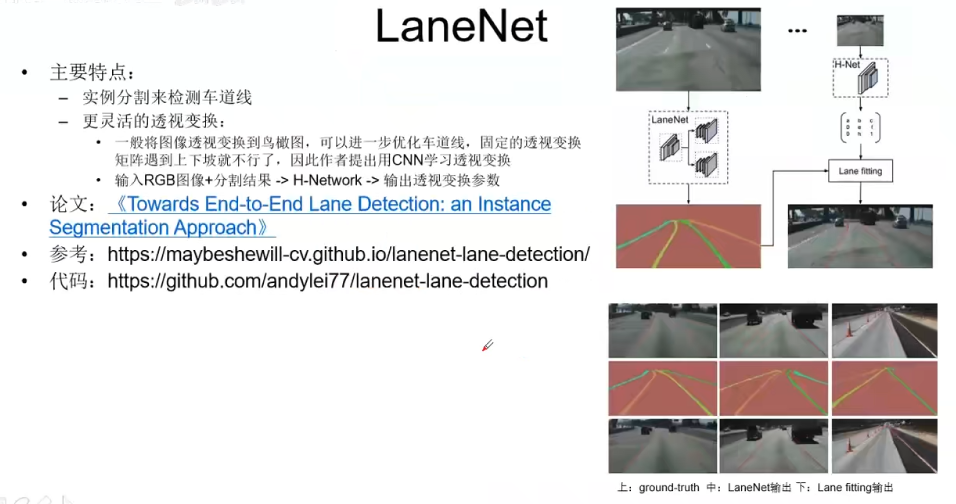
3.3.2 基于图片分割的车道线检测

image-20220412171351872

image-20220412171257608

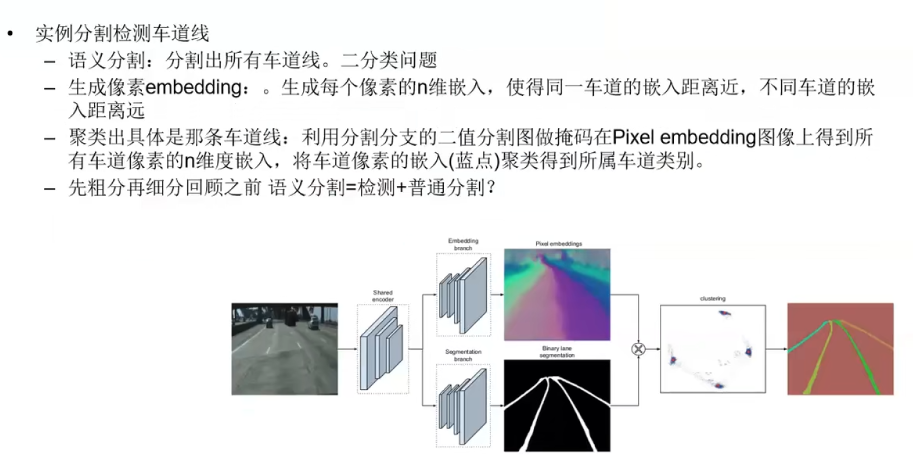
  • 语义分割,二值分类,得到车道
  • 分类车道-同向,—聚类方法 通向车道在n-dim聚类中,距离很近

源码

Github lanenet-lane-detection

1
2
3
4
5
6
7
8
9
10
11
12
13
14
15
16
17
18
19
20
21
22
23
24
25
26
27
28
29
30
31
32
33
34
35
36
37
38
39
40
41
42
43
44
45
46
47
48
49
50
51
52
53
54
55
56
57
58
59
60
61
62
63
64
65
66
67
68
69
70
71
72
# https://github.com/andylei77/lanenet-lane-detection/blob/master/tools/test_lanenet.py

def test_lanenet(image_path, weights_path, use_gpu):
"""
:param image_path:
:param weights_path:
:param use_gpu:
:return:
"""
assert ops.exists(image_path), '{:s} not exist'.format(image_path)

log.info('开始读取图像数据并进行预处理')
t_start = time.time()
image = cv2.imread(image_path, cv2.IMREAD_COLOR)
image_vis = image
image = cv2.resize(image, (512, 256), interpolation=cv2.INTER_LINEAR)
image = image - VGG_MEAN
log.info('图像读取完毕, 耗时: {:.5f}s'.format(time.time() - t_start))

input_tensor = tf.placeholder(dtype=tf.float32, shape=[1, 256, 512, 3], name='input_tensor')
phase_tensor = tf.constant('test', tf.string)

net = lanenet_merge_model.LaneNet(phase=phase_tensor, net_flag='vgg')
binary_seg_ret, instance_seg_ret = net.inference(input_tensor=input_tensor, name='lanenet_model')

cluster = lanenet_cluster.LaneNetCluster()
postprocessor = lanenet_postprocess.LaneNetPoseProcessor()

saver = tf.train.Saver()

# Set sess configuration
if use_gpu:
sess_config = tf.ConfigProto(device_count={'GPU': 1})
else:
sess_config = tf.ConfigProto(device_count={'CPU': 0})
sess_config.gpu_options.per_process_gpu_memory_fraction = CFG.TEST.GPU_MEMORY_FRACTION
sess_config.gpu_options.allow_growth = CFG.TRAIN.TF_ALLOW_GROWTH
sess_config.gpu_options.allocator_type = 'BFC'

sess = tf.Session(config=sess_config)

with sess.as_default():

saver.restore(sess=sess, save_path=weights_path)

t_start = time.time()
binary_seg_image, instance_seg_image = sess.run([binary_seg_ret, instance_seg_ret],
feed_dict={input_tensor: [image]})
t_cost = time.time() - t_start
log.info('单张图像车道线预测耗时: {:.5f}s'.format(t_cost))

binary_seg_image[0] = postprocessor.postprocess(binary_seg_image[0])
mask_image = cluster.get_lane_mask(binary_seg_ret=binary_seg_image[0],
instance_seg_ret=instance_seg_image[0])

for i in range(4):
instance_seg_image[0][:, :, i] = minmax_scale(instance_seg_image[0][:, :, i])
embedding_image = np.array(instance_seg_image[0], np.uint8)

plt.figure('mask_image')
plt.imshow(mask_image[:, :, (2, 1, 0)])
plt.figure('src_image')
plt.imshow(image_vis[:, :, (2, 1, 0)])
plt.figure('instance_image')
plt.imshow(embedding_image[:, :, (2, 1, 0)])
plt.figure('binary_image')
plt.imshow(binary_seg_image[0] * 255, cmap='gray')
plt.show()

sess.close()

return

相关算法汇总

Zhihu 自动驾驶中的车道线检测算法汇总